
IN999 Fast Withdrawal & Bank Binding
The Ultimate Guide to Fast Payouts
One of the core reasons IN999 has maintained its position as a market leader in 2026 is its highly reliable and automated financial gateway. Whether you have successfully predicted a series of WinGo colours, hit a major multiplier in slots, or simply accumulated substantial referral commission from your downline agency team, withdrawing your funds to your bank account is a frictionless process.
The system is built to process massive volumes of payout requests 24 hours a day, 7 days a week. Unlike older platforms that charge arbitrary processing taxes, IN999 boasts a zero hidden fee structure on standard bank withdrawals. What you request from your Withdrawable Balance is exactly what gets credited to your personal account.
Banking Compliance & Wagering Rules
To comply with stringent anti-money laundering (AML) regulations and ensure systemic fairness, the platform implements a standard 1x wagering turnover rule. This simply means that whatever capital you deposit must be played through once before the entire balance becomes withdrawable. For example, if you recharge ₹1000 into your wallet, you must place valid game selections totaling ₹1000 in volume. Once completed, your winnings and remaining capital are entirely free to withdraw.
Additionally, accurate bank binding is mandatory. Discrepancies between the registered name on your IN999 profile and the name linked to your bank account's IFSC code will cause the automated payout system to reject the transfer for your own security.
Step-by-Step Payout Execution
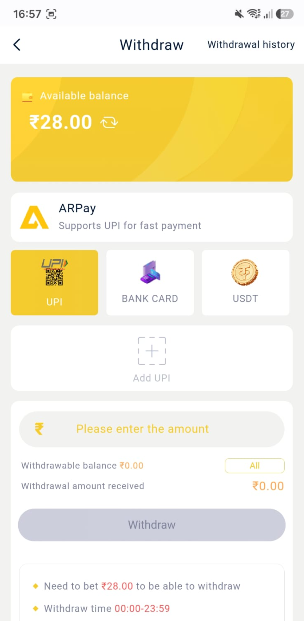
- Navigate to the Wallet tab located on the bottom navigation bar of the application, then select Withdraw.
- If this is your first payout, tap on 'Add Bank Account'. Meticulously enter your real name (as per banking records), the official Bank Name, your Account Number, your active Phone Number, and the precise IFSC code. Tap Save to bind the account.
- Verify that your 'Withdrawable Balance' metric covers the specific amount you intend to redeem.
- Type the requested amount into the input field and select your bound Bank Account or UPI ID as the destination.
- Input your confidential account login password to authorize the transaction and press 'Withdraw'.
- Monitor the transfer by checking the 'Withdrawal History' tab. The status will update from 'Processing' to 'Completed' typically within 10 to 30 minutes.